EFEastern Front Forum Archive
Read-only public archive · no login or tracking

Archived topic · 5 posts

No .exe in the install folder

Bugs & Tech Support

#158972

No .exe in the install folder

You guys need to add an .exe to the game install folder, I deleted the desktop shortcut and now there's no way for me to launch EF without reinstalling it...
#158974

Re: No .exe in the install folder

There is already an exe there, what do you think the desktop shorcut calls? If you deleted the desktop shorcut and don't know how else to run it it is not our fault as you are making it sound :).

If you deleted the shorcut the installer added, you just need to create one by yourself. Precisely, there is a sticky thread in this very subforum that can help you: How to create an Eastern Front shorcut

You have the choice though of selecting the EF launcher exe as target(which doesn't need all the parameters) or directly RelicCoH exe to bypass our launcher.

It is a normal procedure, but it probably is less common nowadays because there are program such as Steam that automatically creates a new desktop shorcut if you need one.
Mors Indecepta

Might controls everything, and without strength you cannot protect anything. Let alone yourself...
#158977

Re: No .exe in the install folder

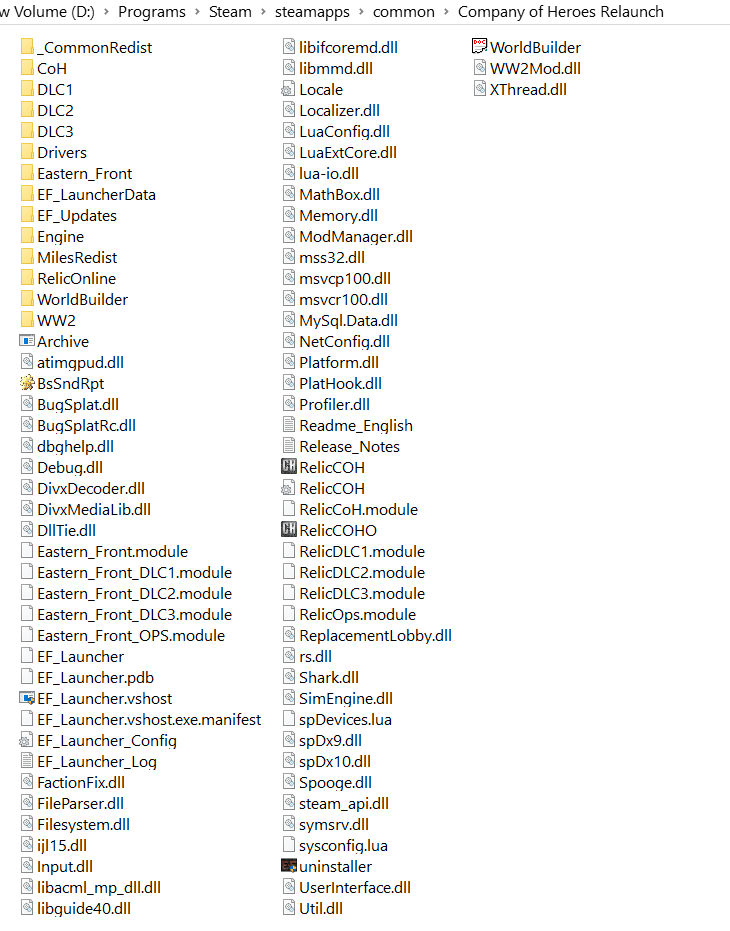
I deleted only the desktop shortcut thinking I could launch the game thru the game folder. That's what I always do with everything, I keep a clean desktop. Yet somehow there's no EF launcher in the game folder. Thanks for the link.

This is what my CoH folder looks like and I haven't touched anything in it.

Forum post image
#158983

Re: No .exe in the install folder

Did you open the installer as zip file and extracted the files in the CoH directory? It seems odd for the installer to skip the file.

Anyway, your EF_Launcher file seems awfully suspicious, could you add the exe extension and see if that's the missing file?
Mors Indecepta

Might controls everything, and without strength you cannot protect anything. Let alone yourself...
#158984

Re: No .exe in the install folder

Funny, it actually works, the .exe just didn't have an icon lol